



🔐 Door Lockers: The Ultimate Guide to Securing Your Space
🚪 Why Door Lockers Matter More Than Ever
In an era where smart homes and urban living are on the rise, door lockers—often taken for granted—are now getting the attention they deserve. Whether you’re securing a home, office, apartment, or Airbnb, choosing the right door locker is your first line of defense against intrusions, theft, and privacy violations.
Let’s be honest: a door without a reliable lock is just a suggestion, not a boundary.
So how do you choose the right one? What’s the difference between a traditional lock and a smart one? And which models are worth your money?
This guide has all the answers.
🔎 What Is a Door Locker?
A door locker, often referred to as a door lock system, is a mechanism that restricts access to a door using a key, code, biometric data, or remote control.
Main Types of Door Lockers:
- Mechanical Locks (e.g., deadbolts, mortise locks)
- Electronic or Digital Locks (PIN-based or RFID)
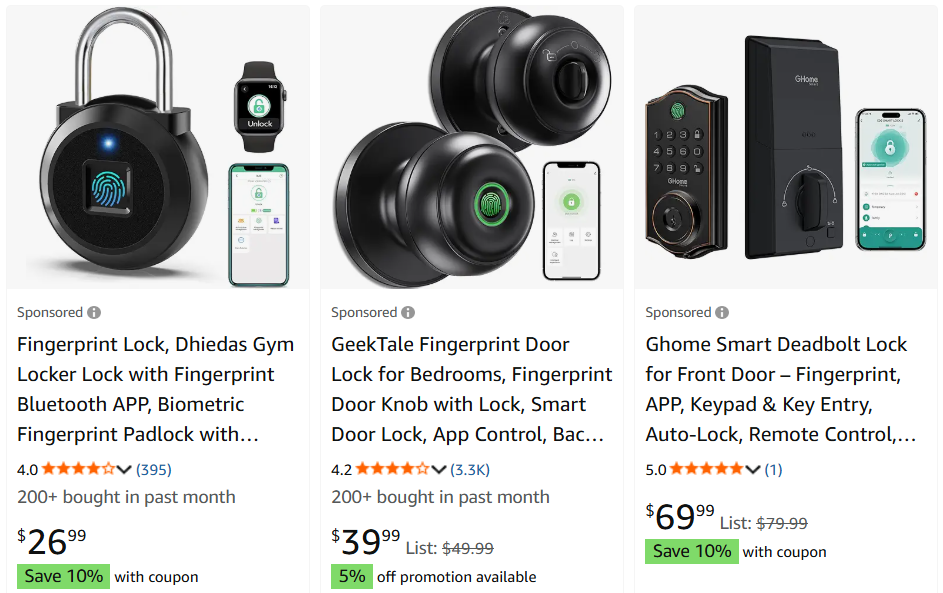
- Smart Locks (Bluetooth, Wi-Fi-enabled)
- Biometric Locks (fingerprint or retina scanners)
- Chain, Slide, or Latch Lockers (additional internal protection)
Each type offers a different balance of security, convenience, and cost.
🧱 Traditional Door Lockers: Still Going Strong
Despite the tech revolution, mechanical locks remain the backbone of home security around the world.
🔑 Common Mechanical Locks:
- Deadbolts – Strong, durable, perfect for front doors
- Mortise Locks – Common in commercial buildings, embedded in the door
- Rim Locks – Surface-mounted, often used as secondary locks
- Latch Bolts – Found in doorknob locks, easier to pick
✅ Pros:
- Long-lasting
- No batteries required
- Familiar and widely used
❌ Cons:
- Vulnerable to picking or bumping
- No remote access or monitoring
- Lost keys = security risk
📱 Smart Door Lockers: Convenience Meets Innovation
Smart locks are reshaping how we think about home access. Connected via Bluetooth, Wi-Fi, or Zigbee, they let you lock/unlock your door from your phone, assign virtual keys, and even log entry history.
🧠 Smart Lock Features to Consider:
| Feature | Why It Matters |
|---|---|
| Remote Access | Lock/unlock from anywhere using an app |
| User Management | Create temporary codes or virtual keys |
| Activity Logs | See who entered and when |
| Voice Integration | Connect with Alexa, Google Assistant |
| Auto-Lock/Unlock | Based on proximity or timer |
| Two-Factor Authentication | Enhanced digital security |
Top Brands in 2025:
- August Smart Lock Pro
- Yale Assure Lock
- Samsung SHP-DP609
- Ultraloq U-Bolt Pro
- Level Lock Invisible
🧬 Biometric Door Lockers: The Future Is in Your Fingertips
Fingerprint and retina-scan door locks sound futuristic—but they’re already here.
🔐 Biometric Lock Benefits:
- No keys or codes to forget
- Fast, one-touch access
- Harder to hack or duplicate
- Can store multiple fingerprints
Potential Drawbacks:
- Require power (battery or wired)
- May fail in extreme weather
- Backup method (key/code) still needed
Perfect for high-security areas or tech-savvy homes looking to upgrade security with convenience.
🔒 Secondary Lockers: Boosting Internal Safety
Sometimes, one lock isn’t enough. Secondary door lockers are installed on the inside of the door and offer manual override control.
Types Include:
- Chain locks
- Slide bolts
- Bar latches
- Security bars for sliding doors
These are especially important in hotels, apartments, or shared housing, giving occupants peace of mind while inside.
🏠 Where to Use Door Lockers: Room-by-Room Guide
| Location | Best Locker Type |
|---|---|
| Front Door | Deadbolt + Smart Lock |
| Back Door | Deadbolt + Motion Sensor Light |
| Garage Entry | Smart Lock with Auto-Lock |
| Bedroom | Simple knob lock or smart keypad |
| Office/Home Studio | Biometric lock or keypad |
| Rental Property (Airbnb) | Smart lock with temporary codes |
Whether you’re securing a family home or a remote cabin, the right lock depends on the purpose of the room and the risk profile.
🧠 Key Considerations Before Buying a Door Locker
- Security Level – Is it for main entry or internal use?
- Power Source – Battery-operated or manual?
- Installation – DIY or professional? Some smart locks are plug-and-play, others need wiring.
- Compatibility – Will it work with your door material and thickness?
- Smart Features – Do you need app control, or is a sturdy manual lock enough?
- Aesthetic Design – Modern, minimal, or vintage look?
🛒 Top Door Lockers You Can Buy in 2025
| Model | Type | Key Features |
|---|---|---|
| August Wi-Fi Smart Lock | Smart | Keyless, app control, logs entries |
| Yale Assure SL | Smart Keypad | Sleek design, integrates with smart home |
| Schlage Encode Plus | Smart | Apple HomeKey support, auto-lock |
| Ultraloq U-Bolt Pro | Biometric | 6-in-1 access, anti-peep keypad |
| Kwikset 980 | Mechanical Deadbolt | Grade 1 security, simple and sturdy |
🔋 Power Backup: What If the Lock Dies?
One concern with electronic or smart locks is power failure. Thankfully, most smart lockers today have:
- Battery alerts via app
- Mechanical key override
- USB emergency charging port
Pro tip: Replace batteries every 6–12 months or set a recurring reminder to avoid getting locked out.
📝 Final Thoughts: Are Smart Door Lockers Worth It?
Yes—if convenience, control, and modern security matter to you.
Traditional locks still work beautifully and may suit lower-risk situations. But if you value:
- Remote access for guests
- Knowing when your kids come home
- Avoiding key duplication hassles
…then investing in a smart or biometric door locker can seriously upgrade your security experience.
In today’s world, a secure door is no longer just about locking things up—it’s about managing access with confidence, control, and convenience.